Posts

Running Linux Astronomy Apps on Chrome OS
Image
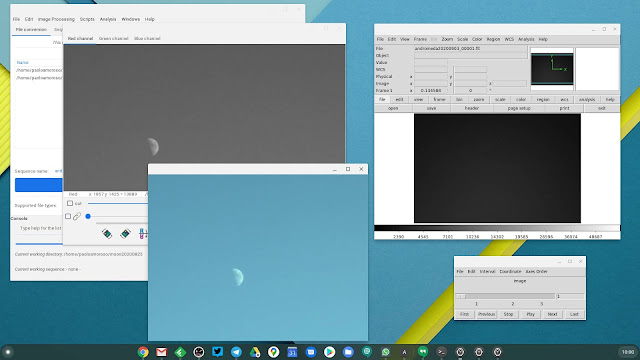
I got a Pixel 4 XL for its unique astrophotography features, along with a tripod for long-exposure photography with the phone. This is not enough, though. The workflow for producing images of the sky is best achieved with specialized astronomical image viewing and processing software. There are two good such Linux apps that work fine on my Chromebox in Crostini, Siril and SAOImage DS9 . I can install the .deb files from the Chrome OS Files app or the Terminal. Siril (left) and DS9 (right) for Linux running in Crostini on my Chromebox. Siril is an advanced image processing app . Although it loads all the major general-purpose image and video file formats, it internally works with FITS, the leading format for astronomical images and data. Siril supports calibration, stacking, background and noise removal, scripting, and many more features. With the Pixel 4 XL I take photos of the sky in RAW and export them as DNG files, the format the Google camera app that ships with Pixel devices s...

A Tripod for Smartphone Astrophotography

Image
 As an amateur astronomer, Astrophotography mode is one reason why I got a Pixel 4 XL . But there’s another essential piece of gear for taking long-exposure photos of star fields or astronomical phenomena, a tripod. The one I bought for the Pixel 4 XL is a Phinistec photo tripod . My Phinistec tripod with some accessories: a carrying pouch, a phone adapter, and a Bluetooth shutter. I do all my astrophotography from an apartment building in Milan, Italy, where I live. It’s a light-polluted urban area, but these days I can’t wander around much. I observe the sky from the apartment’s small balconies, which have the area of a medium-sized carpet. This constrains the camera holding gear I can use. I wanted a full-height tripod that can extend to at least waist level, not a tabletop tripod, as I can’t use tables or other elevated surfaces to set the photo equipment on. The Phinistec tripod can extend to a height of 125 cm. It’s cheap, compact, and very light . It comes with a smartphone...

AppGyver Composer Review: First Impressions

Image
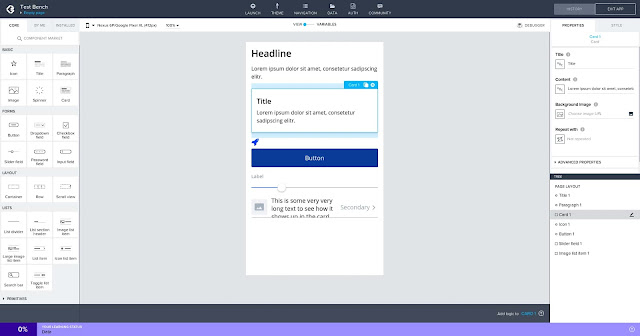
It’s not just non-coders who use no-code development tools. If anything, having some programming experience gives an appreciation of how much time and effort these tools can save. This is why, despite having been a hobby programmer for decades , I’m interested in no-code solutions. The ones I tried in the past are App Inventor and Thunkable , for creating mobile apps, and Bubble for web apps. An Android app under development in the AppGyver Composer IDE on my Chromebox. A few months ago I discovered AppGyver Composer, an impressive app builder for developing both mobile and web apps that seems more powerful than the others I’ve seen. Here are some quick notes on my experience with the tool so far. Keep in mind I'm still exploring AppGyver, not using it for real projects. About AppGyver AppGyver Composer Pro is the best no-code, drag & drop app development environment I've seen. It allows to create both web and mobile apps for Android (even Android TV) and iOS, ...

Why I Got a Pixel 4 XL When Google Discontinued It

Image
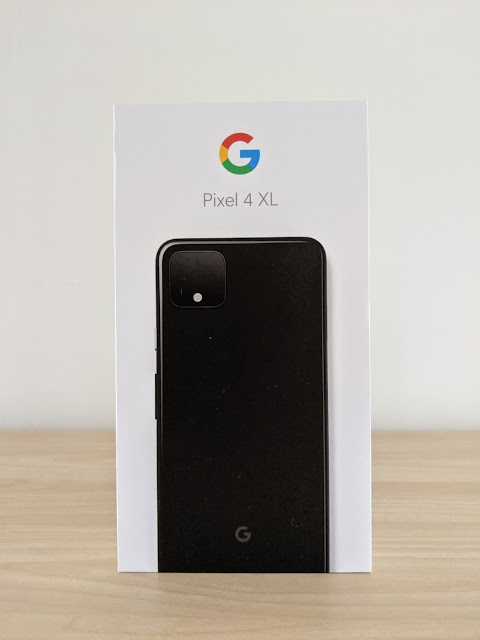
Google discontinued the Pixel 4 in August 2020 and pulled it from the US Google Store. As soon as I learned of it, I ordered a Pixel 4 XL from the Google Store in Italy where I live and the phone was still in stock. Why did I get it? Because I like the 4 XL more than the current and planned Pixel models . I don’t mind the issues and limitations others criticize. And it’s not clear whether the Pixel 5 will ship with a telephoto lens, which I want. The packaging of my Google Pixel 4 XL phone. My previous phone I had been using a Pixel 2 XL since January 2018. This is no surprise as I always used Google-branded Android phones as my daily drivers. The Pixel 2 was the first of the Pixel family distributed in Italy. I was eager to try a Pixel and went with the 2 XL because of the higher specs, a more capable battery, and a better experience. In October 2020, a couple of months from now, the Pixel 2 line will reach the end of life with no more system updates and support. Expe...

Practicing Google Featured on The Slice

Image
Issue #008 of The Slice featured my newsletter Practicing Google. The Slice is a weekly newsletter to discover new and emerging creations such as SaaS products, podcasts, and newsletters. It offers actionable resources for founders and makers. The sign-up page of The Slice newsletter. Listory’s interview with The Slice’s author Nic opens with «The Slice highlights the underdogs of the tech world». I love this characterization and focus because typical case studies and success stories highlight the most successful entrepreneurs, authors, or products. The outliers, the unicorns. I’m actually more inspired by smaller, realistic achievements such as newsletters with a few hundred subscribers, or ebooks that make hundreds of Dollars a year. They are closer to where I am in my journey, more approachable. These are goals I can see myself reach given reasonable time and effort. I don’t even bother thinking how to imitate the outliers. Therefore, I’m extremely please...

A List of Newsletter Directories

Image
Growing your newsletter can be challenging. Especially at the beginning, when few know you or your work. Having your newsletter listed in specialized directories that attract potentially interested readers is a valuable discoverability opportunity. The InboxReads newsletter directory. These directories are databases that let readers search or browse newsletters by category . Sometimes the directories share the newsletters to their social channels or in email updates. The continuous flow of subscriptions coming from directories, even if small, adds up. Maybe it's just an impression. However, I’ve been noticing a small but steady flow of subscriptions since submitting my newsletter Practicing Google to several directories. It's just a trickle right now. But noticeable. I have been bookmarking and keeping track of directories since working on my newsletter. I share them here and I’ll keep the list up to date. Open directories You can submit your newsl...

My First Year of Blogging With Blogger

Image
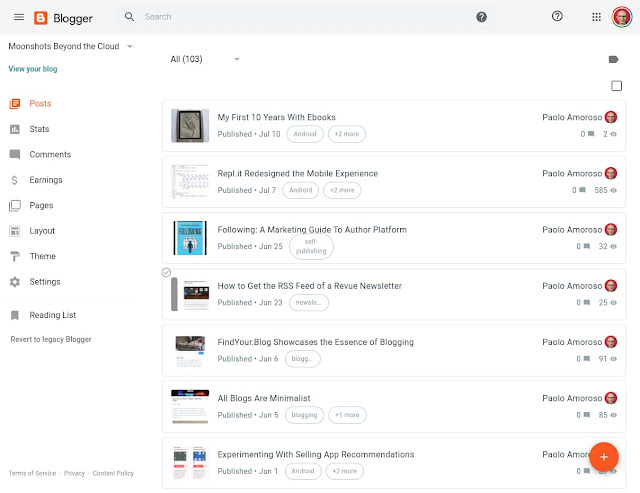
One year ago today, on 15 July 2019, I returned to Google Blogger and started a new blog . It was the conclusion of a journey that began over a dozen years earlier with my first blog on a self-hosted platform. I later published another blog on Blogger. Next, I left blogging for a few years. For several more years, I used Google+ as a blogging platform. Finally, I briefly tried the IndieWeb, which is not ready for prime time but intriguing. The Blogger dashboard of my blog Moonshots Beyond the Cloud. What was my first year on Blogger like? Uneventful. I chose Blogger because it’s a simple tool which doesn’t get in the way of writing and publishing . It does all I need and lets me focus on content. Google has been refreshing Blogger with a gradual redesign for the past couple of years. They’re rebuilding the platform on foundations rooted in a modern, mobile friendly design language and infrastructure. However, the new Blogger doesn’t provide much in the way ...