Posts

Showing posts with the label web

AppGyver Composer Review: First Impressions
Image
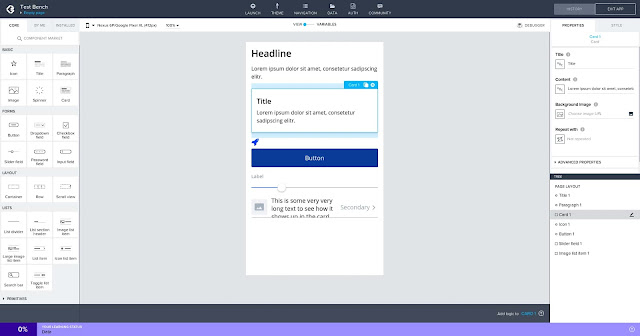
It’s not just non-coders who use no-code development tools. If anything, having some programming experience gives an appreciation of how much time and effort these tools can save. This is why, despite having been a hobby programmer for decades , I’m interested in no-code solutions. The ones I tried in the past are App Inventor and Thunkable , for creating mobile apps, and Bubble for web apps. An Android app under development in the AppGyver Composer IDE on my Chromebox. A few months ago I discovered AppGyver Composer, an impressive app builder for developing both mobile and web apps that seems more powerful than the others I’ve seen. Here are some quick notes on my experience with the tool so far. Keep in mind I'm still exploring AppGyver, not using it for real projects. About AppGyver AppGyver Composer Pro is the best no-code, drag & drop app development environment I've seen. It allows to create both web and mobile apps for Android (even Android TV) and iOS, ...

All Blogs Are Minimalist

Image
One feature that made Medium popular is the minimalist design of its blogs. They emphasize text and images and have no blogrolls, widgets, tag clouds, or other distracting elements. It was a unique feature in the days of the desktop web when Medium came out. A post of my blog in Chrome on my Pixel 2 XL phone. Now the web is mobile-first and all responsive websites have a similar minimalist design on the smartphone and tablet screens the majority of readers use. They hide most of the design complexity behind a hamburger menu with links to other pages. If you open a post, the text and images dominate the page area. Just like Medium. For example, my Blogger blog has a responsive template that works the same way. Visit it on your phone. There are a few links at the top of the page and a handful of post recommendations at the bottom. These minor elements are hardly distracting. WordPress blogs and most other responsive websites do the same. The mobile revolution ...

Experimenting With Selling App Recommendations

Image
Are you looking for an app that does something you need but can’t find it, or don’t want to put in the time and effort to search for it? For a small fee, I will search the app for you and recommend one that matches your requirements. The app recommendation services I sell on my Buy Me A Coffee page. I can search for Android apps, web apps, cloud tools, Chrome extensions, add-ons, or websites that work in Chrome. Except for games as I’m not into gaming. I’ll recommend at least one app that does what you want , summarize its key features and issues, and try it on different Android and Chrome OS devices to report how it works — if possible or practical. If no such app exists, or I’m unable to find it, I’ll suggest one that does something similar or matches some of your requirements. I have extensive experience with searching for Android and web apps. I love looking for and experimenting with new and interesting apps I may need someday. I showcase some of the best apps ...

Supporting Web Publishers With Scroll

Image
Scroll is a new monetization platform for news sites and blogs alternative to advertising. The readers who pay a subscription to the platform can access the partner sites without ads. Scroll shares the revenue with publishers based on the visits they get. The home page of Scroll. After a free trial and an introductory price of $2.49/month, the subscription will cost $4.99/month . I stumbled upon the platform when Android Police announced joining Scroll as a partner. Android Police is my favorite Android tech news site for its great content and distinctive voice. I have been subscribing to Scroll for four months and, of the over 300 partner sites, Android Police is the only one I read regularly . My visits to other sites are a blip on the radar. The fraction of my visits to Android Police vs other Scroll partner sites. And this is the problem with Scroll. If I subscribe at the full price, I'll end up paying $60/year for a single publication, which would be too much for the valu...

Pixlr E: A Photo Editor in the Cloud

Image
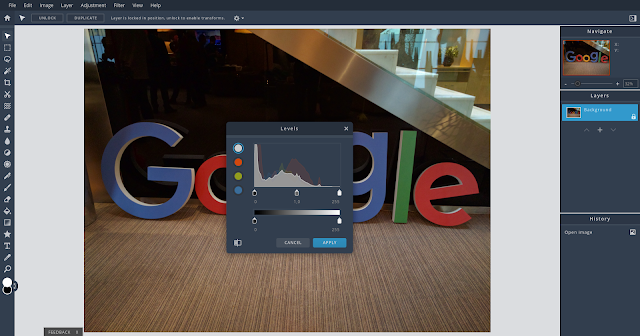
Pixlr E is a photo editing web app. Along with the basic image editing features, it provides advanced tools for retouching, applying effects, drawing, filtering, and adjusting photos. Pixlr E also supports layers and a versatile command history, which lets you undo back to a specific state or change. Pixlr E with the light theme on my ASUS Chromebox. The workspace is configurable and you can minimize or remove the right sidebar to get a larger editing area. There are keyboard shortcuts, too. The app feels intuitive and easy to master. Although I use Pixlr E mostly on Chrome OS, it works well and is fast on all platforms and devices . Pixlr E is surprisingly fast and usable also on Android, even on my low-end Lenovo Tab E7 tablet . However, on the tablet, tapping the confirmation button in dialogs doesn’t seem to do anything. There’s another quirk on Android. The editing dialogs can’t apparently be moved, so they cover most of the image and you can’t see the effects of th...

Mercury Reader Removes the Clutter from Web Pages

Image
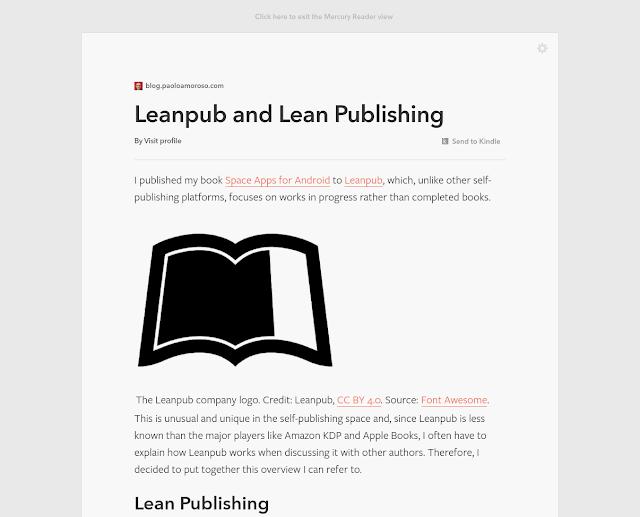
The Mercury Reader Chrome extension is a reader mode tool for cleaning off the clutter from web pages. It reformats the pages by removing distracting elements and leaving only text and images for a cleaner experience. Mercury Reader is one of my must-have extensions and I use it daily. A post of my blog reformatted with Mercury Reader. It’s installed on all my Chrome OS devices and it’s available whenever I need it. I can fire it up when visiting sites with tiny or illegible fonts, uncomfortable color combinations, pop-ups, excessively wide text margins, pages encrusted with ads, or with designs that interfere with reading. I don’t use a permanent ad-blocker , so Mercury Reader doubles as an on-demand ad blocker. The extension removes distracting features such as navigation elements, sidebars, headers, and ads . Besides the images, it leaves only the text and sets it with clean fonts and attributes that make reading more pleasing. Although it does a good job in most cases...

Pixlr X: An Image Editor in the Cloud

Image
Now that Android and Linux apps run on Chrome OS you can use pretty much any bitmap image editor, including the venerable GIMP. But, in the early days, the Pixlr cloud editor was the default recommendation — and the only practical choice. The cropping tool and options of Pixlr X running on my Chromebox. The original Pixlr and its related apps, such as the Pixlr Express lightweight editor, will be discontinued along with Flash on which they’re based. But the new Pixlr owner, the 123RF media company, rebuilt the toolset and developed Pixlr X as the heir of the Pixlr family of editors . Pixlr X has more robust foundations grounded in contemporary web technologies. I use Pixlr X on my Chrome OS devices and I like it for three reasons. The first is the app is fast and doesn’t get in the way of the work I want to do. Next, Pixlr X has a clean and modern design. The site is ad-supported but the few ads it serves blend with the site tastefully. Unlike the original Pixlr, Pixlr ...

Experimenting With Webmentions and Blogger

I’m experimenting with some IndieWeb features on my Blogger blog, particularly webmentions. Webmentions is a web standard for merging the reactions to a blog post across the web. The reactions typically appear as comments to the original post and link back to the sources. I followed the IndieWeb Blogger tutorials for adding to my blog an h-card microformat and support for webmentions. It’s pretty easy. For example, adding webmentions through Brid.gy requires adding just one line of code to the blog’s template. I originally set up Brid.gy to listen to webmentions from Twitter. This works great but, when a tweet has a link to a post of my blog, the full text of the tweet is published as a comment. Copying all the text of other users’ tweets makes me uneasy, especially considering those users may not be aware of it. Therefore, I turned off listening to webmentions from Twitter and deleted the Twitter reactions Brid.gy had initially added as comments to my posts. The blog is...

StreamYard as an Alternative to Hangouts on Air: First Impressions

Image
Google discontinued Hangouts on Air on August 1, 2019. The StreamYard video streaming platform is the best replacement I found among the alternatives . I'm going to tell how I tested StreamYard in a demanding situation and what I've learned. StreamYard can livestream video feeds from up to 6 participants and save a recording to YouTube or other video platforms. It works fully in the cloud, a huge plus for a Chrome OS user like me. And it’s even better than Hangouts on Air as it has additional useful features such as showing user comments in the YouTube chat of a livestream and banners , i.e. text cards. It also provides a few preset layouts for arranging on the screen the camera feeds of the participants. A key feature is the ability to screenshare a desktop window or browser tab as well as any audio playing there. This allows, for example, to stream a YouTube video along with its soundtrack. The product has a free tier that overlays StreamYard’s logo in livestreams and ...

The History of the Web, Volume I

Image
I love the book The History of the Web, Volume I by Jay Hoffmann. It’s a collection of essays from the author’s newsletter The History of the Web . The cover of The History of the Web, Volume I by Jay Hoffmann in Google Play Books on my Pixel 2 XL. Although I’ve been using and closely following the web since its early days, and used or visited several of the tools and sites Jay tells about, I’ve found many things and projects in the book I wasn’t aware of back then. It covers the history of the web from many angles such as the technology, the software, the infrastructure, the protocols, the communities, the spirit of experimentation, and more. The book is based on solid, in-depth research and gives a concise but complete account of the projects and events it discusses.

My Brain Is My Ad Blocker

These days ad blockers are used mostly for improving privacy, security, performance, and resource control. But, when it comes to their primary purpose of blocking ads and advertising content, I don’t need these tools. I have been using the web since the early 1990s, when the first annoying and disruptive ads started spreading. And I’ve been doing such a deliberate effort to ignore them it eventually became second nature. When I visit a web page, my brain instinctively forces my eyes to tune out any areas with anything resembling advertising content, especially animations. This avoidance is so effective I don’t notice ads even on the sites I want to support by checking anything to click I’m genuinely interested in. I invariably forget and move to the next site. Although I don’t have true ad blockers, I do occasionally use a tool for reading pages with highly distracting or disruptive content, including ads. It’s the Mercury Reader Chrome extension, a reader mode option that ref...

What it Means the Cloud Is Someone Else’s Computer

The cloud is someone else’s computer. It’s a catchy and widely popular line, regardless of its meaning and implications. But it’s typically used to emphasize its cons and negative connotations, such as data in the cloud may not be safe or may disappear. However, there are also pros. If the cloud is someone else’s computer, they’re likely less sloppy with backups and security. And they have a team of skilled technicians and engineers who work around the clock to fix issues while you sleep, without the need for you to lift a single finger. By the way, your money is data in someone else’s bank.

I Deleted My Facebook Account

I deleted my Facebook account on July 4 because Mike Elgan’s declaration of independence from Facebook inspired me. However, even if many others delete their accounts now, Facebook won’t likely notice any fluctuations in the noise of a rounding error. Why? Why did I delete my account? I’m not against tech giants. For example, I feel comfortable with Google and use Amazon. But Facebook repeatedly crossed every possible line to such an extent it’s difficult to see any good faith or willingness to change. It’s easy for me to delete my account because I never used Facebook much. Ahead of deleting the account I downloaded my Facebook data. It turns out I never used it much. Over the 4-5 years I have been active on the platform I generated 4.1 MB worth of data. By comparison I have used Google+ daily since day one for 8 years until it was shut down and I downloaded around 1.7 GB of data. Deleting their accounts may be more difficult for others who have many contacts and use the plat...