Posts

Showing posts with the label astronomy

Silence Astronomy and Space Android Apps
Image
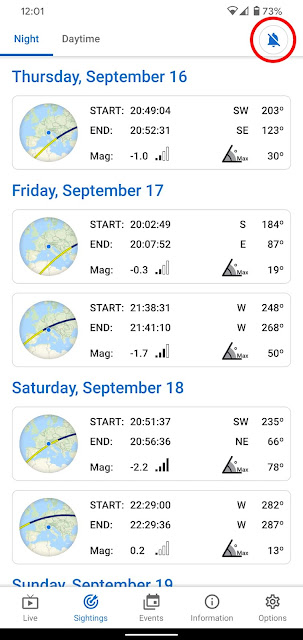
 What's the first thing to do after installing an astronomy or space app on Android? Turn off any alarms and notifications in the app's settings. Although these apps try to be helpful, they are noisy and alert you of interesting celestial phenomena or space events, such as the phases of the Moon, planetary conjunctions, satellite passes, and rocket launches. The option to turn off alarms in the ISS passes screen of the ISS onLive Android app. I learnt it the hard way when alarms in the wee hours of the night showed up on my Pixel 4 XL phone. It turned out an update of the ISS onLive app had set up alarms for International Space Station passes.

Simulating an Eclipse with Celestia for Android

Image
What would a lunar eclipse look like on the Moon? Closeup of the Earth hiding the Sun in a simulation of the May 26, 2021 lunar eclipse seen from the Moon. With Celestia for Android I simulated the May 26, 2021 lunar eclipse seen from the Moon . I screen-recorded a video on my ASUS Chromebox 3 while the Celestia app simulated the eclipse as seen from the lunar surface in an area near the North pole. Standing on the Moon the phenomenon would appear as a solar eclipse , with the Earth moving in front of the Sun and hiding it. In the video time runs 1000 X faster, from 04:00 UTC on May 26 to 19:00 UTC. The frame has a field of view of about 21° vertically. Notice the surface darkening up to the horizon while the Earth covers the Sun and casts a shadow on the Moon. How to simulate the eclipse Celestia is the best universe simulation software. To create the simulation, I used the Celestia app for Android on my ASUS Chromebox 3 not only because it runs well on Chrome OS but also because a ...

Explore the Moon and Mars with GlobeViewer for Android

Image
GlobeViewer Moon and GlobeViewer Mars are interactive Moon and Mars globe apps for Android. These incredible works are the best planetary globes for Android. GlobeViewer Moon for Android on my Pixel 4 XL. Under the hood they share the same rendering engine that combines shading, color, and perspective to present the shape and relief of geological features in a realistic, dramatic way. The camera controls let you explore these worlds from far away or fly close to their surfaces. The views of the Moon and Mars are stunning and educational. The apps come with high-resolution planetary textures based on space images and accurate altitude data of the celestial bodies. You can control the perception of relief by selecting the textures and adjusting the properties of simulated reflected light that determines the visual strength of surface details. 3D model of the north-eastern Montes Apenninus area at the eastern side of Oceanus Procellarum in GlobeViewer Moon on my Pixel 4 XL. Near the c...

How to View the Rings From Saturn

Image
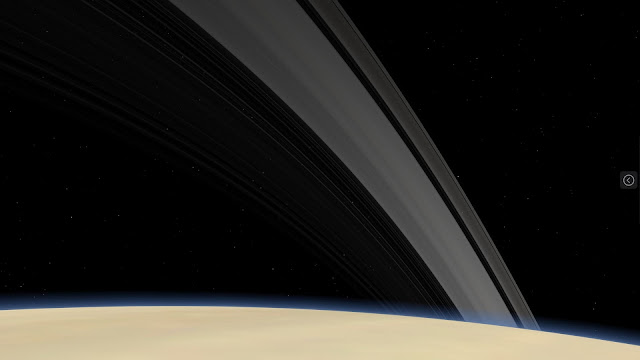
What would the rings of Saturn look like from the globe of the planet? Imagine you flew a spacecraft to the visible surface at the top of the atmosphere. The rings may look like this. The rings seen from the surface of Saturn at middle northern latitudes. View in Celestia for Android on my ASUS Chromebox. On Android, you have a spacecraft: the Celestia app . I’ll explain how to view the rings of Saturn with Celestia for Android. But the instructions work also with Chromebooks, Android devices, and likely other operating systems. What you need Celestia is the best universe simulation software. It’s a popular open-source project originally developed for desktop operating systems. Now Celestia is available also on Android and works well on Chrome OS. It’s actually one of the few Android apps optimized for Chrome OS. A unique feature of Celestia is the ability to “land” on the surface of a planet or celestial body , i.e. change the point of view as if you looked at the sky standing on or ...

Mons Rumker: the Chang'e 5 Moon Landing Site

Image
Mons Rümker is the Moon landing site of the lander-ascender spacecraft of Chang’e 5, China’s lunar sample return mission. It’s one of the most interesting volcanic areas of the Moon. To explore this unique feature, I made a video of Mons Rümker in Google Maps . Mons Rümker in Google Maps. The video opens with the bright crater Copernicus at the center of the view. It then centers on and zooms in on Mons Rümker, rotating around the plateau to show its 3D structure and relief. I made the video by recording on my Chromebox a screencast of Google Maps at 1080p. Finding Mons Rümker may not be easy, as it's a subtle area and you need to know where to look for. Unfortunately, Google Maps doesn’t let you search for or share features on planetary bodies other than the Earth. The video hopefully helps to locate the area in Google Maps, here’s how: visit maps.google.com zoom all the way out click Satellite click  ☰ to open the menu click Globe zoom out more click Moon click 3D to show the c...

Running Linux Astronomy Apps on Chrome OS

Image
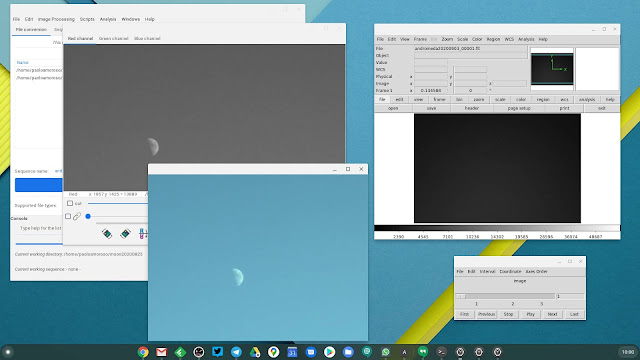
I got a Pixel 4 XL for its unique astrophotography features, along with a tripod for long-exposure photography with the phone. This is not enough, though. The workflow for producing images of the sky is best achieved with specialized astronomical image viewing and processing software. There are two good such Linux apps that work fine on my Chromebox in Crostini, Siril and SAOImage DS9 . I can install the .deb files from the Chrome OS Files app or the Terminal. Siril (left) and DS9 (right) for Linux running in Crostini on my Chromebox. Siril is an advanced image processing app . Although it loads all the major general-purpose image and video file formats, it internally works with FITS, the leading format for astronomical images and data. Siril supports calibration, stacking, background and noise removal, scripting, and many more features. With the Pixel 4 XL I take photos of the sky in RAW and export them as DNG files, the format the Google camera app that ships with Pixel devices s...

A Tripod for Smartphone Astrophotography

Image
 As an amateur astronomer, Astrophotography mode is one reason why I got a Pixel 4 XL . But there’s another essential piece of gear for taking long-exposure photos of star fields or astronomical phenomena, a tripod. The one I bought for the Pixel 4 XL is a Phinistec photo tripod . My Phinistec tripod with some accessories: a carrying pouch, a phone adapter, and a Bluetooth shutter. I do all my astrophotography from an apartment building in Milan, Italy, where I live. It’s a light-polluted urban area, but these days I can’t wander around much. I observe the sky from the apartment’s small balconies, which have the area of a medium-sized carpet. This constrains the camera holding gear I can use. I wanted a full-height tripod that can extend to at least waist level, not a tabletop tripod, as I can’t use tables or other elevated surfaces to set the photo equipment on. The Phinistec tripod can extend to a height of 125 cm. It’s cheap, compact, and very light . It comes with a smartphone...

Space Apps for Android: 1 Mar 2020 Update

Image
The March 1, 2020 update of my book Space Apps for Android: Discover the Best Astronomy and Space Apps is out. If you purchased the book, the latest version is available for free download in ePub, Mobi, and PDF format in your Leanpub library . The cover of Space Apps for Android in the Google Play Books app on my Lenovo Tab E7 tablet. In chapter Introduction , I moved the description of my blog to the new subsection Learn more and mentioned my newsletter there, too. Chapter Ephemeris and Astronomical Phenomena has a new entry for the app Nightshift: Stargazing & Astronomy . Finally, the new appendix Release Notes lists the changes in all the versions of the book. I updated the book because I’m self-publishing it as a work in-progress with the Lean Publishing process. Therefore, I constantly revise and expand it.

Visualize the Moon with Lunescope Moon Viewer for Android

Image
Lunescope Moon Viewer (formerly Moon Phase Pro) is an Android app for simulating the appearance of the Moon. It combines visualizations of the phases and eclipses with a lunar globe. Lunescope Moon Viewer on my Pixel 2 XL phone. The app shows the phases and their calendar, presents the lunar topography in an interactive 3D globe, simulates eclipses, and provides orbital data, local rising and setting times, and other numerical information. The globe is a realistic representation of the surface and has hires textures from space images. The eclipse screen summarizes the event’s circumstances at a glance and illustrates what to expect , which is helpful for planning observations. These summaries aggregate the times of the various stages, their durations, the appearance of the Moon, and its position in the sky above or below the horizon. Lunescope is not just a good astronomy tool, it stands out among Android apps for its integration with the Google ecosystem . It’s a lightwe...

Explore Planetary Systems with Eyes on Exoplanets

Image
Eyes on Exoplanets is a NASA web app for visualizing extrasolar planet systems. This simple app packs and organizes a lot of data on planetary systems of other stars in a series of clear visualizations. The Eyes on Exoplanets web app in Chrome on my Pixel 2 XL phone. The app is actually a website, so to open it visit exoplanets.nasa.gov/eyes-on-exoplanets from your browser. This responsive site works very well also on mobile devices. It runs smoothly in Chrome on my Android devices, a Pixel 2 XL phone and a Lenovo Tab E7 tablet.. Eyes on Exoplanets provides an interactive 3D model of the distribution of the known exoplanets, as well as the ability of viewing the systems on a sky map from a location on the Earth. Either way, you can select a stellar system and zoom into another visualization showing the orbits of its known exoplanets, along with the highlighted habitable zone. You can further zoom in on individual planets or their star to view artist depictions of what the bo...

Reading Impractical Python Projects

Image
If you experienced the home and personal computing revolution of the early 1980s, you may have read some books that got you hooked up with programming. These books led you through the intellectual adventure of using computing to explore interesting problem domains. I got a recent book that brought back that fascination and excitement with programming, Impractical Python Projects: Playful Programming Activities to Make You Smarter by Lee Vaughan. The cover of the book Impractical Python Projects in the Google Play Books app on my Pixel 2 XL phone. The book is not a Python tutorial or guide. Instead, it presents stimulating coding projects for non-programmers who want to use Python for doing experiments, test theories, or simulate natural phenomena . This includes professionals who are not software developers but use programming to solve problems in science and engineering. Exploring and understanding the problem domain is an integral part of the book’s projects along with th...

Space Apps for Android: 8 Sep 2019 Update

Image
I released a new update of my book Space Apps for Android: Discover the Best Astronomy and Space Apps on September 8, 2019. If you purchased the book, you can download the latest version for free from your Leanpub library . Chapter The Sun of my book Space Apps for Android in Google Play Books on my Pixel 2 XL phone. This new version comes with the complete rewrite of chapter The Sun , which now has an introduction. I removed all the material on Solar Observer because the app is partially obsolete and doesn’t provide much value. I also added the entries for Eclipse Calculator 2 , the best eclipse app, and SunViewer 2, which lets you view the latest solar images. Why an update? Because I’m self-publishing the book as a work in progress with the Lean Publishing process, so I’m constantly updating and expanding it.

How to Work With Astronomical Data: A Tutorial

Markus Pössel posted the review paper A Beginner’s Guide to Working with Astronomical Data . It’s a comprehensive overview of processing astronomical images, spectra, and catalog data with application software and the Python programming language. The paper also covers simulations and simulated data. The value of this paper is it distills into a single resource a lot of material available elsewhere, and provides guidance on getting started with the major categories of astronomical data.

Simulate Eclipses With Eclipse Calculator 2 for Android

Image
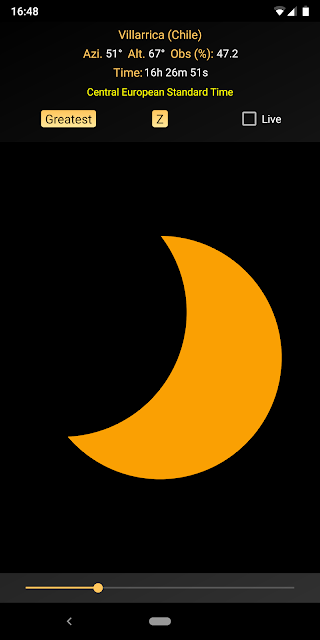
Eclipse Calculator 2 is the best Android app for eclipses and planetary transits. It calculates and simulates solar and lunar eclipses as well as transits of Mercury and Venus across the Sun. It’s the best because it provides all the information to visualize the circumstances of the events and plan the observations . In addition, it presents this information through highly effective charts, data, and maps. The 14 Dec 2020 total solar eclipse simulated by Eclipse Calculator 2 on my Pixel 2 XL. You start by quickly searching for the events you’re interested in, such as by type or observing location, and drilling down to the ones you want to know more about. Then the app summarizes all sorts of details and information. For a total solar eclipse, for example, you get a map of the lunar shadow on the Earth, a view of the solar disk, a map of the sky with the visible stars, and even the lunar limb profile with Baily’s beads . Letting time run or interactively adjusting it shows ...

Plan Your Astronomical Observations With Nightshift for Android

Image
Nightshift: Stargazing & Astronomy is one of the best Android apps for planning astronomical observations and assessing visibility conditions. Nightshift: Stargazing & Astronomy on my Pixel 2 XL. Through a combination of charts and data cards the app shows at a glance the observing conditions on a given night. It provides information on cloud coverage, moonlight, rise and set times, angular altitudes, celestial events, and the visibility of various bodies such as the planets and deep-sky objects. In addition it can compute visibility predictions for telescopes and other optical instruments. The strength of Nightshift is it effectively presents and summarizes a wealth of relevant data in a clean, simple format that’s quick to scan. More handy features are coming. The developer, for example, is working to support predictions of conjunctions between the planets, the Moon and bright stars, and so on. I wrote a book that helps you discover and use similar apps, Space App...