Posts

Showing posts with the label Replit

Publishing Python Documentation to Read The Docs With Jupyter Book
Image
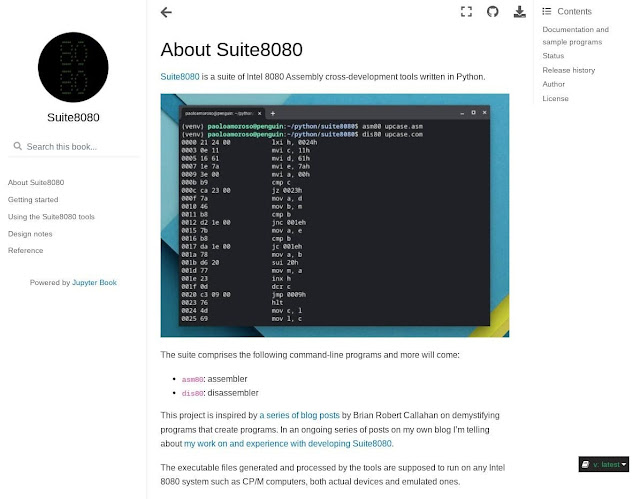
I published the documentation of Suite8080 , a suite of Intel 8080 Assembly cross-development tools I’m writing in Python with Replit. The Suite8080 documentation website built with Jupyter Book and Sphinx and hosted at Read The Docs. Like many Python projects, the documentation comprises a website hosted at Read The Docs. But, unlike most projects, I didn’t use Sphinx directly to generate the website. Instead, I created the documentation with Jupyter Book by The Executable Book Project, well known for Jupyter Notebook. Jupyter Book is a new system for producing publication-quality books and documents for software and research projects. Jupyter Book is significant and promising because, by building on top of Sphinx as a backend and offering a Markdown-based formatting language, it hides the complexity of Sphinx and reduces friction when writing documentation . Before this project I checked out Sphinx directly, but its arcane formatting language and complex setup didn’t make me go fa...

An Intel 8080 Assembly Suite in Python

Image
A blog post I stumbled upon made me start a new project, crank out lots of Python code, slip down a rabbit hole of arcane and fascinating corners of retrocomputing, and overflow with fun. The project is Suite8080 , a suite of Intel 8080 Assembly cross-development tools comprising an assembler and a disassembler. I developed it in Python entirely with Replit . At over 1,500 lines of code , it’s my second and largest Python project after Spacestills , a NASA TV still image viewer of about 340 lines of code. A hello world Intel 8080 program running in the z80pack CP/M emulator on Crostini Linux. I assembled the program with asm80, the Suite8080 assembler. Why did I write software for a half-century old CPU? This is the story of how I got started with Suite8080, how I developed it, the challenges I faced, and what I learned. Let’s start before the beginning. Background I’m a hobby programmer and a Python beginner, not a professional developer. To practice with the language, I finally set o...

Python with Replit: A Journey in the Cloud

Image
Can I use only Replit for all my Python development? It’s what I set out to find. Follow along my journey to coding in Python on Chrome OS only with the tools and resources of Replit . I want to learn to live off the land in Replit; to develop, test, check into version control, run, document, deploy, and host Python code with Replit. I’ll share my experiences in Python with Replit , a blog post series documenting my ongoing efforts. A Python REPL in Replit on my ASUS Chromebox 3. This is not a philosophical quest for cloud purity or a “use only brand X for 30 days” blog challenge. It’s rather the realization of how much my tools shape the way I work. When in Chrome, do as the chromies do. I want Replit to be my main Python environment, figure out how to work around its limitations, and push the boundaries of what it can do. I’m a hobby programmer and a Python beginner, not a professional developer. These constraints define the journey and frame my setup and tooling decisions. Why use R...

A NASA TV Still Frame Viewer in Python

Image
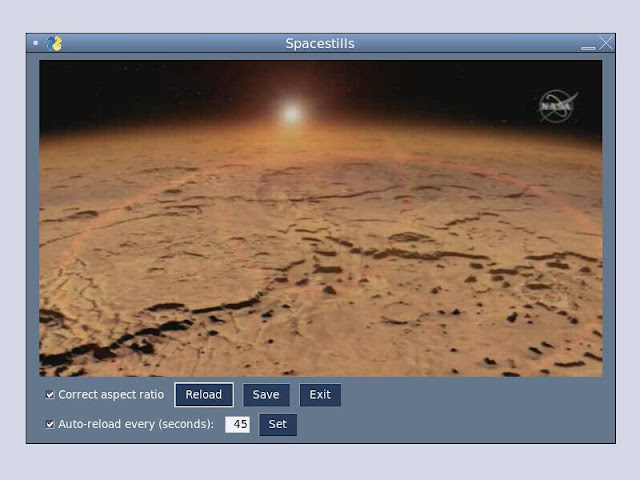
I wrote Spacestills , a Python program for viewing NASA TV still frames. The main window of Spacestills running on Replit. As a hobbyist wishing to improve my Python programming skills, for some time I’ve wanted to work on learning projects more substantial than code snippets , throwaway tools, or short scripts. Spacestillschecks several boxes. The problem domain is one of my primary interests, space exploration. At about 350 lines of code, it’s a non-trivial system with a GUI. It accesses the network to download data from the web. Finally, the program relies on a few Python libraries. About the program Spacestills periodically downloads NASA TV still frames from a web feed and displays them in a GUI. The program allows to correct the aspect ratio of the frames and save them in PNG format. It downloads the latest frame automatically and gives the option to reload manually, disable the automatic reload, or change the download frequency. As a learning exercise, Spacestillsis a basic pro...

Code With Repl.it Review

Image
Code With Repl.it: From Beginner to Expert Through Guided Tutorials is a free ebook by Gareth Dwyer sponsored by Repl.it. The cover of Code with Repl.it in Google Play Books on my Pixel 4 XL. It contains a series of tutorials and walkthroughs to learn Python using Repl.it. Each tutorial is a complete project that implements an app or tool . The book groups the tutorials into three parts, from beginner to advanced. Part 1 covers the basics of developing and running code with Repl.it. Part 2 is about software engineering best practices and tools such as version control with GitHub, testing with Pytest, collaborating with other developers, code security, and more. The last part builds more advanced projects in domains ranging from web apps to machine learning. Repl.it is an excellent online IDE with support for Python and dozens of other languages. As a Chrome OS enthusiast, I love Repl.it as it works fully in the cloud and requires no software other than a browser. Code With Repl.it t...

Repl.it Redesigned the Mobile Experience

Image
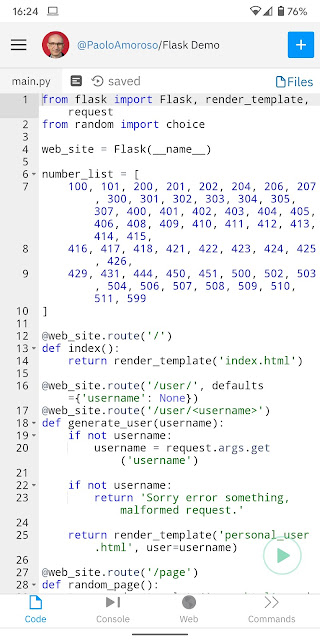
The cloud IDE Repl.it was redesigned to improve the user experience on mobile devices. On smartphones, now the focused REPL pane takes up most of the screen. The redesign takes advantage of native mobile design patterns and lets you switch to a different pane from the bottom navigation bar . There are panes for the code editor, the console, and the output. A Python REPL in Repl.it on my Pixel 2 XL phone. Tapping the code in the editor brings up a contextual menu with some options of the desktop version. You can select, search, or paste text, or open the full command palette. On my Pixel 2 XL phone in Chrome, lines with up to 42 characters fit in the editor’s width. The editor wraps longer lines. But most of the code usually keeps the original indentation and its structure is still clear at a glance. The console pane wraps text, too, so no horizontal scrolling is required. You can get an idea of what Repl.it looks like on mobile by opening the browser on your ...

I Was Interviewed by Repl.it

Image
Nathan Zilora interviewed me for Repl Talk and Repl.it Weekly, the Repl.it community forum. After a brief introduction I talked about how I started using Repl.it, how I plan to combine astronomy and programming in my activities, the Astropy astronomy Python library and how programmers can learn to use it, the space podcast I co-host, and the Google Product Experts Program I'm a member of. My interview on Repl.it's community forum Repl Talk. Thanks to Nathan and Repl.it for the opportunity of sharing my experiences and thoughts! Repl.it is a multi-language cloud IDE. It supports dozens of programming languages and frameworks. It’s my favorite IDE because it works fully in the cloud, a killer feature for a Chrome OS enthusiast like me. Repl.it pushes the limits of what development tools can do in the cloud. It’s constantly improving and provides some advanced features, such as Multiplayer Mode for collaborative development and Git/GitHub support . Another neat fea...

How to Use Kivy on Repl.it

Image
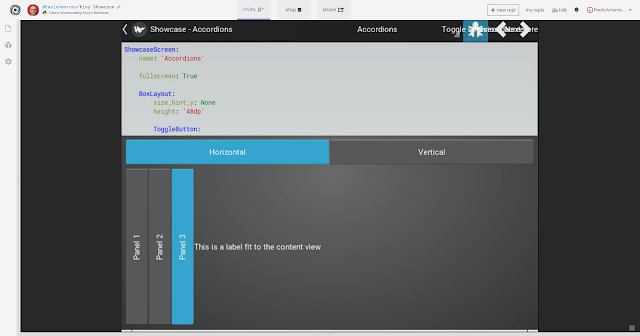
I made the Kivy  Python cross-platform GUI framework work in a GFX REPL on Repl.it . Repl.it is a multi-language cloud IDE with good support for Python. To use Kivy on Repl.it, just create a Pygame REPL, which is among the Kivy dependencies, and install Kivy with the package manager or by adding kivy to requirements.txt . Starting such a REPL in a new session takes a while to download and build the required libraries, at least several minutes. So be patient. This REPL runs the Kivy Showcase , a demo app that showcases some of Kivy’s features. The demo works fine except for a few overlapping widgets in the top bar. And it has some latency issues, but the poor performance is mostly a consequence of the experimental state of GFX. If you adjust the handles along the edges of the REPL panes to close all the panes except the app’s, you can use most of the web page area. Here’s a screenshot of what it looks like. I can’t wait for GFX to support running graphical apps as a website...