Posts

Showing posts with the label Python

Suite8080 0.5.0

Image
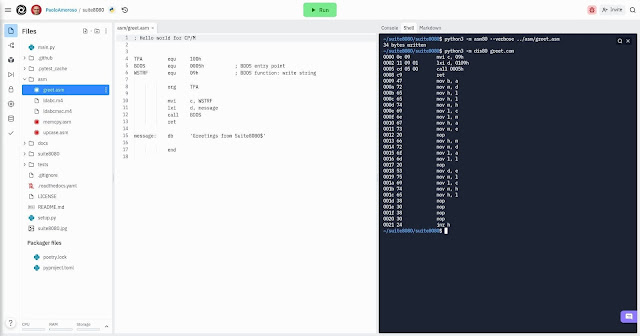
Version 0.5.0 of Suite8080 is out, and the package is available on PyPI . Suite8080 is a suite of Intel 8080 Assembly cross-development tools I’m writing in Python. The Assembly source of the Suite8080 hello world demo with uppercase constants. The new release is all about expressiveness. I extended the assembler to accept uppercase identifiers for instruction mnemonics, labels, and constants. The change allows an Assembly coding style in which constants are in all uppercase and stand out. For example, here’s the Suite8080 hello world demo greet.asm with constants such as TPA and BDOS : ; Hello world for CP/M TPA equ 100h BDOS equ 0005h ; BDOS entry point WSTRF equ 09h ; BDOS function: write string org TPA mvi c, WSTRF lxi d, message call BDOS ret message: db 'Greetings from Suite8080$' end I reformatted in this style a...
Publishing Python Documentation to Read The Docs With Jupyter Book

Image
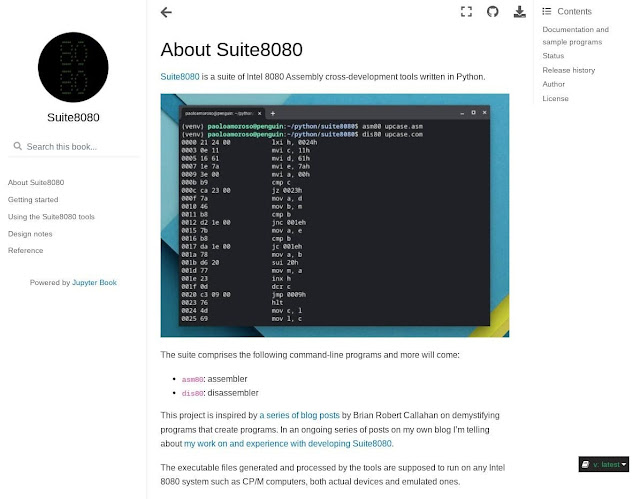
I published the documentation of Suite8080 , a suite of Intel 8080 Assembly cross-development tools I’m writing in Python with Replit. The Suite8080 documentation website built with Jupyter Book and Sphinx and hosted at Read The Docs. Like many Python projects, the documentation comprises a website hosted at Read The Docs. But, unlike most projects, I didn’t use Sphinx directly to generate the website. Instead, I created the documentation with Jupyter Book by The Executable Book Project, well known for Jupyter Notebook. Jupyter Book is a new system for producing publication-quality books and documents for software and research projects. Jupyter Book is significant and promising because, by building on top of Sphinx as a backend and offering a Markdown-based formatting language, it hides the complexity of Sphinx and reduces friction when writing documentation . Before this project I checked out Sphinx directly, but its arcane formatting language and complex setup didn’t make me go fa...

Suite8080 0.4.0

Image
I released version 0.4.0 of Suite8080 , the suite of Intel 8080 Assembly cross-development tools I’m writing in Python. It bundles some minor features and changes I did while thinking about what major task to work on next. New features There are two main new features in this release. A SID debugging session in the z80pack CP/M emulator. SID loaded the greet.com hello world program assembled with asm80, along with the greet.sym symbol table. The l command disassembled the program and showed the symbols MESSAGE and BDOS . The d command dumped memory from the address of the MESSAGE symbol. The first is the ability of asm80 to save the assembled program’s symbol table in the .sym CP/M file format . The other feature enhances the assembler to accept the double-quote character ” as a string delimiter , which means strings and character constants may be written as ”This is a string” and ”F” . In addition, the output of the assembler's help message ( -h option) and verbose mode...

An Intel 8080 Assembly Suite in Python

Image
A blog post I stumbled upon made me start a new project, crank out lots of Python code, slip down a rabbit hole of arcane and fascinating corners of retrocomputing, and overflow with fun. The project is Suite8080 , a suite of Intel 8080 Assembly cross-development tools comprising an assembler and a disassembler. I developed it in Python entirely with Replit . At over 1,500 lines of code , it’s my second and largest Python project after Spacestills , a NASA TV still image viewer of about 340 lines of code. A hello world Intel 8080 program running in the z80pack CP/M emulator on Crostini Linux. I assembled the program with asm80, the Suite8080 assembler. Why did I write software for a half-century old CPU? This is the story of how I got started with Suite8080, how I developed it, the challenges I faced, and what I learned. Let’s start before the beginning. Background I’m a hobby programmer and a Python beginner, not a professional developer. To practice with the language, I finally set o...

How to Add Code Syntax Highlighting to Blogger

Image
On my blog I always wanted to format source code in Python and a couple more languages, but couldn’t find a convenient way. Until I read a tutorial on adding syntax highlighting to Blogger blogs like mine. The Blogger post composer actually provides the monospace Courier font that may be used for source code, but it works well only for inline text . If I apply the Courier font to a block of code, the composer renders each line as a separate paragraph. This leaves too much vertical space that makes the code look ugly. A workaround is to switch to the HTML view in the composer and wrap the block within <pre> ... </pre> tags, which insert the correct line spacing. However, the code doesn’t stand out on the page and there’s room for improving its scannability and visual impact. Fortunately, Blogger is an old dog I can teach new tricks to, like the setup the tutorial I found presents. A Python code snippet with syntax highlighting rendered by highlights.js in a post of the Moo...

4 Things Tutorials Don't Tell You About PyPI

Image
Time to celebrate! I published my first Python package to PyPI, Suite8080 . It’s a suite of Intel 8080 Assembly cross-development tools. It’s in early development, misses some tools, and is rough around the edges. But it works, does something useful (if you’re into retrocomputing), and I’m having ridiculous amounts of fun with this hobby project. The Python Package Index (PyPI) website. The celebration is wearing out and I’m about to resume the work to complete and improve Suite8080, yet something still bugs me. Although it’s well known PyPI is unforgiving for good reasons, the package publishing process is not as straightforward as the tutorials make it seem . I run into a few unexpected minor bumps none of the guides mention. It’s not that the tutorials aren’t good, they are. I recommend the Real Python article on publishing a package to PyPI . But the authors of these guides are so experienced, and probably so detached from the challenges beginners face, they may not be aware some i...

Python with Replit: A Journey in the Cloud

Image
Can I use only Replit for all my Python development? It’s what I set out to find. Follow along my journey to coding in Python on Chrome OS only with the tools and resources of Replit . I want to learn to live off the land in Replit; to develop, test, check into version control, run, document, deploy, and host Python code with Replit. I’ll share my experiences in Python with Replit , a blog post series documenting my ongoing efforts. A Python REPL in Replit on my ASUS Chromebox 3. This is not a philosophical quest for cloud purity or a “use only brand X for 30 days” blog challenge. It’s rather the realization of how much my tools shape the way I work. When in Chrome, do as the chromies do. I want Replit to be my main Python environment, figure out how to work around its limitations, and push the boundaries of what it can do. I’m a hobby programmer and a Python beginner, not a professional developer. These constraints define the journey and frame my setup and tooling decisions. Why use R...

A NASA TV Still Frame Viewer in Python

Image
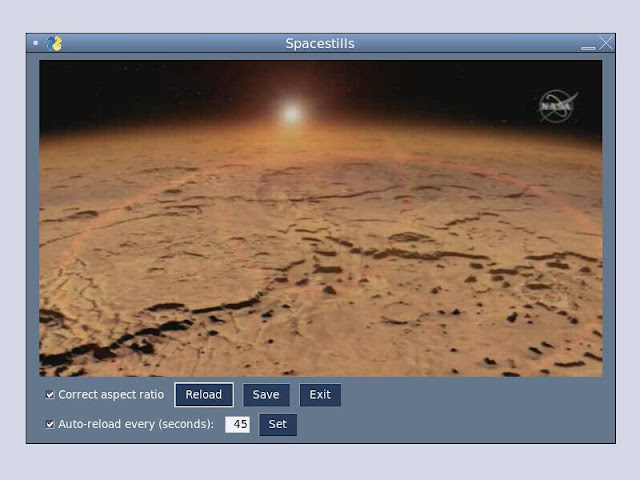
I wrote Spacestills , a Python program for viewing NASA TV still frames. The main window of Spacestills running on Replit. As a hobbyist wishing to improve my Python programming skills, for some time I’ve wanted to work on learning projects more substantial than code snippets , throwaway tools, or short scripts. Spacestillschecks several boxes. The problem domain is one of my primary interests, space exploration. At about 350 lines of code, it’s a non-trivial system with a GUI. It accesses the network to download data from the web. Finally, the program relies on a few Python libraries. About the program Spacestills periodically downloads NASA TV still frames from a web feed and displays them in a GUI. The program allows to correct the aspect ratio of the frames and save them in PNG format. It downloads the latest frame automatically and gives the option to reload manually, disable the automatic reload, or change the download frequency. As a learning exercise, Spacestillsis a basic pro...