Posts

View the Surface of Mars with Mars Explorer for Android

Image
Mars Explorer is an Android app for viewing the raw images of the surface of Mars taken by NASA’s Curiosity, Spirit, and Opportunity rovers, and the InSight lander. Mars Explorer on my Pixel 4 XL phone. You can get the latest images from the active missions, Curiosity and InSight, and browse the image archives of the completed missions, Spirit and Opportunity. The app lets you view, save as favorites, and share the images. To drill down to the ones you’re interested in, there are options for selecting the relevant Sol (Martian day) or terrestrial date. In Mars Explorer you’ll also find general information on Mars, the vehicles that take the images, and their instruments. Weather reports and environmental measurements from the Curiosity rover complete the feature set. The app runs well also on Chrome OS, where it takes advantage of the large screens of Chromebooks by providing an alternate layout that better organizes the content and the navigation elements. The layout activates on And...

Practicing Google Featured on TestingCatalog

Image
Issue 162 of TestingCatalog featured my newsletter Practicing Google. The TestingCatalog newsletter. TestingCatalog , one of my favorite newsletters , provides news, updates, and insights on Beta and unreleased Android apps. It's a great resource to feel the pulse of the Android apps world and keep up with what developers are experimenting with. Thanks TestingCatalog!

Narakeet Review: A Narrated Video Editor

Image
Narakeet , formerly Video Puppet, is an impressive web tool for making narrated videos with an AI voice generator . It’s now out of Beta and open for business. Artwork on the Narakeet home page. What sets Narakeet apart is the ability to automate most or all of the production steps . From generating visuals, adding background music, and synchronizing media, to synthesizing voice over narration. The tool is great for quickly putting together instructional or marketing videos, tutorials, demos, and more. The narration features leverage some of the best machine-generated voice synthesis systems in the industry like Amazon Polly and IBM Watson Text to Speech. Although Narakeet’s over a hundred voice models in more than 20 languages are very natural-sounding and lifelike, it’s possible to provide recordings of your own voice narration. To create a video, upload a PowerPoint presentation with the slides containing the visuals and the voice over text in the speaker notes. Or write script fil...

Don't Publish Large ePub or Mobi Ebooks

Image
Do you sell ebooks directly on Gumroad or on your website? Don't ship large ePub or Mobi files, they may make it impossible or impractical for readers to load the files in their favorite reading apps. Here's an example of an ebook I bought on Gumroad and available in PDF, ePub, and Mobi format. I'd like to read it on my Android phone and tablet. My ePub reading app, Google Play Books, is ubiquitous on Android. It can sideload files up to 100 MB, but the ePub version of that Gumroad book has a size of 105 MB. I can't use the Kindle Android app via Send to Kindle because the book's Mobi file is 33 MB. Gmail, along with most other email clients, can't send attachments over 25 MB. For larger files, Gmail sends download links that don't work with Amazon's automated Send to Kindle system, which can't click links. Also, Gumroad doesn't provide a Send to Kindle button for the file the author supplied. This leaves the PDF file. However, it’s a suboptimal...

Mockup Generators for Google Devices

Image
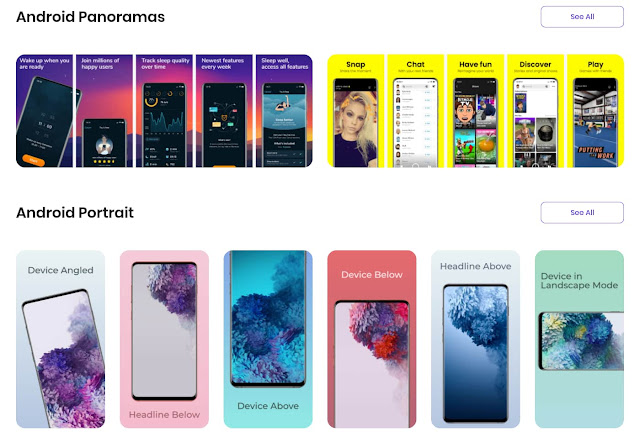
 Mockup generators are tools that combine screenshots with renderings of the frames and bezels of the desktop or mobile devices they are taken on. The generators can also overlay the screenshots to photos of actual devices. The Previewed mockup generator with some Android device frames. The combined images are used as illustrations or for promoting apps, ebooks, websites, or other digital products. There are several mockup generators for mobile and desktop devices such as smartphones, tablets, and laptops. But they usually focus on Apple hardware. The few frames in the Google ecosystems like Android phones or Chromebooks, when available, are often out of date. Google's own Android device art generator is missing the latest generations of flagships. Chrome can take screenshots with device frames but, again, there are no recent Android devices. Yeah, the cobbler's children have no shoes. List of mockup generators for Google devices I use mockup generators for sharing Android and...

Running Linux Astronomy Apps on Chrome OS

Image
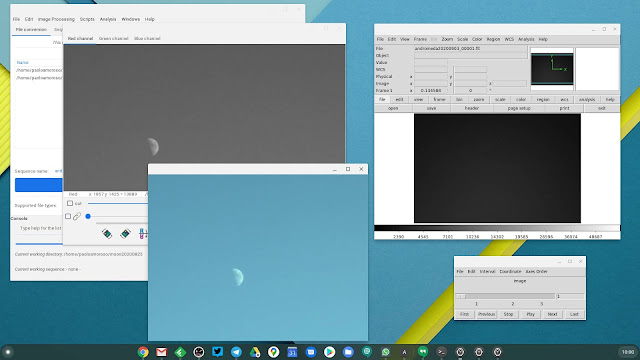
I got a Pixel 4 XL for its unique astrophotography features, along with a tripod for long-exposure photography with the phone. This is not enough, though. The workflow for producing images of the sky is best achieved with specialized astronomical image viewing and processing software. There are two good such Linux apps that work fine on my Chromebox in Crostini, Siril and SAOImage DS9 . I can install the .deb files from the Chrome OS Files app or the Terminal. Siril (left) and DS9 (right) for Linux running in Crostini on my Chromebox. Siril is an advanced image processing app . Although it loads all the major general-purpose image and video file formats, it internally works with FITS, the leading format for astronomical images and data. Siril supports calibration, stacking, background and noise removal, scripting, and many more features. With the Pixel 4 XL I take photos of the sky in RAW and export them as DNG files, the format the Google camera app that ships with Pixel devices s...

A Tripod for Smartphone Astrophotography

Image
 As an amateur astronomer, Astrophotography mode is one reason why I got a Pixel 4 XL . But there’s another essential piece of gear for taking long-exposure photos of star fields or astronomical phenomena, a tripod. The one I bought for the Pixel 4 XL is a Phinistec photo tripod . My Phinistec tripod with some accessories: a carrying pouch, a phone adapter, and a Bluetooth shutter. I do all my astrophotography from an apartment building in Milan, Italy, where I live. It’s a light-polluted urban area, but these days I can’t wander around much. I observe the sky from the apartment’s small balconies, which have the area of a medium-sized carpet. This constrains the camera holding gear I can use. I wanted a full-height tripod that can extend to at least waist level, not a tabletop tripod, as I can’t use tables or other elevated surfaces to set the photo equipment on. The Phinistec tripod can extend to a height of 125 cm. It’s cheap, compact, and very light . It comes with a smartphone...